If you have ever handed a piece of content off to a new writer and received something that felt nothing like your brand, you already understand why a content creation SOP matters. A standard operating procedure (SOP) for content is a documented, step-by-step guide that tells anyone on your team exactly how to research, write, edit, format, and publish content in a way that matches your standards every time.
Without content process documentation, your output depends entirely on who happens to be working that day. With it, your process runs independently of any one person. That is the difference between a business and a job.
This guide walks you through how to build a practical content SOP from scratch, design it for different roles on your team, connect it to your broader publishing pipeline, and keep it useful as you grow.
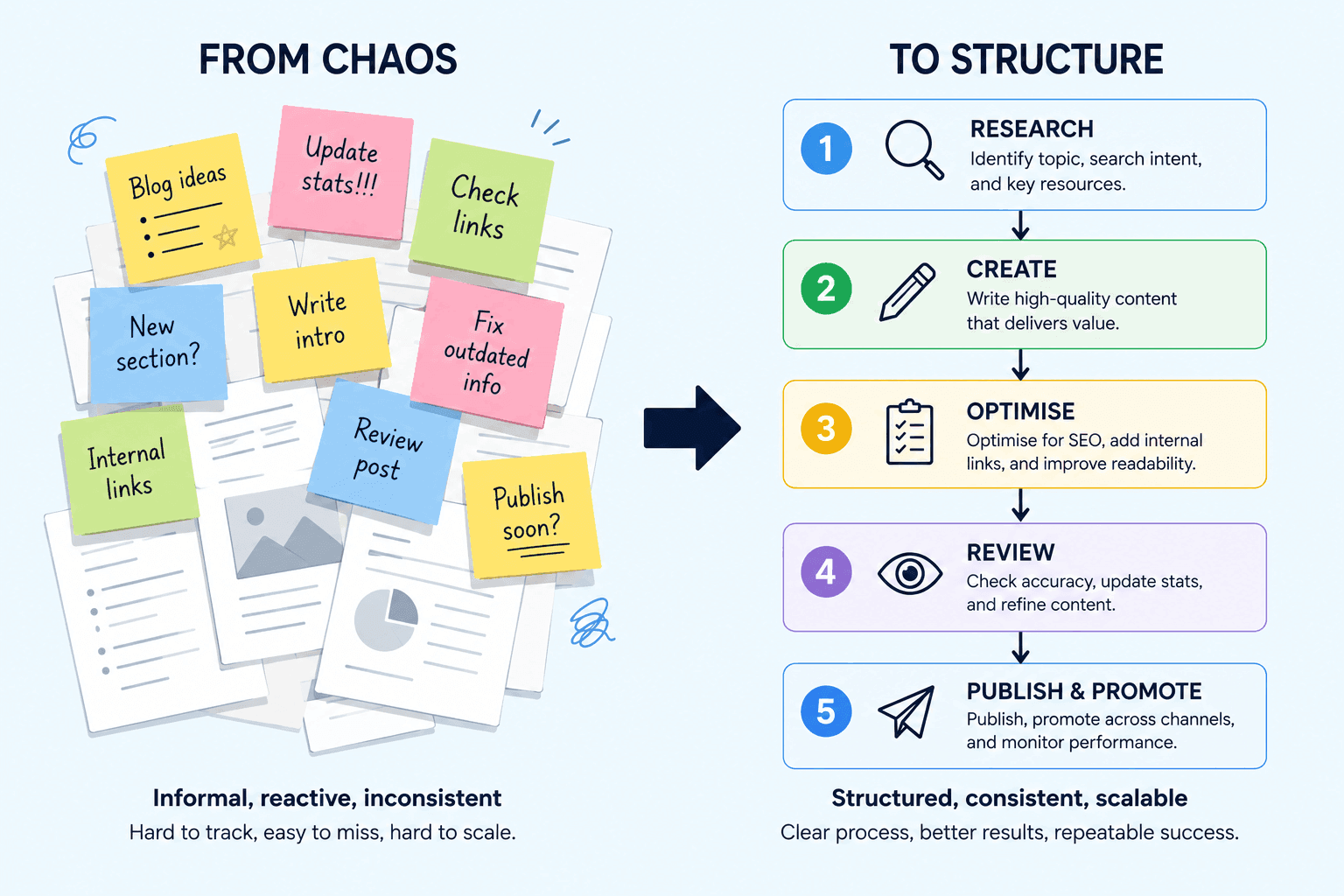
What a Content Creation SOP Actually Is (and Is Not)
A content SOP is not a style guide, and it is not an editorial calendar. Those are related tools, but they serve different purposes. A style guide tells people how your brand sounds. An editorial calendar tells people what to publish and when. An SOP tells people how to do the work, start to finish.
Think of an SOP as a recipe. A recipe does not just list ingredients. It describes every step in the right order, specifies quantities, and flags common mistakes. A good content SOP does the same thing for your publishing workflow.
What a Content SOP Covers
- The exact steps involved in producing one piece of content
- Who is responsible for each step
- What tools and platforms to use at each stage
- What the output should look like before moving to the next step
- What to do when something goes wrong
Many business owners confuse documenting their process with writing a long manual nobody reads. A working SOP is different. It is short enough to be useful, specific enough to be actionable, and structured so that a new team member can follow it on day one without asking you ten questions.
Key Takeaway: An SOP documents the how of content production so your process can run without your constant involvement.
Why Content Process Documentation Pays Off
Business owners often resist writing SOPs because it feels like extra work. And it is, upfront. But the payoff comes quickly once you start bringing on help or scaling your content output.
Consider this scenario: you publish four blog posts per month and handle everything yourself. That works fine until you want to publish eight posts, hire a freelance writer, or take a two-week holiday. Without documentation, every one of those scenarios causes problems.
The Business Case in Numbers
A freelance writer who receives a clear SOP with a brief template, SEO checklist, and formatting guide requires roughly two to three rounds of edits to match your standards. A writer without an SOP typically needs eight to ten rounds before quality stabilises, costing you time that has real monetary value.
For established entrepreneurs preparing to sell their business, documented content processes directly increase valuation. Buyers pay more for businesses that do not depend on the founder. A well-documented content system is evidence that your operation can run without you. For more on building systems that increase business value, see our guide on Exit Strategy Planning: Build a Business Worth Selling.
The Four Core Benefits
- Consistency: Every piece of content follows the same quality bar, regardless of who produces it
- Speed: Writers spend less time guessing and more time creating
- Scalability: Onboarding a new team member takes hours, not weeks
- Accountability: Everyone knows what they are responsible for and when
Key Takeaway: Documented content processes reduce revision cycles, lower onboarding costs, and make your business more attractive to buyers or investors.
How to Build Your Content Creation SOP from Scratch
The most common mistake people make when writing SOPs is trying to document an ideal process rather than their actual one. Start with what you do today, then improve it.
Step 1: Audit Your Current Process
Before you write a single line of your SOP, walk through the production of one recent piece of content and log every action you took. Include the small things: checking a keyword in Google Search Console, resizing a featured image, copying a URL into your editorial calendar.
Most business owners discover they have 15 to 25 distinct steps they perform without thinking. Each one is a candidate for documentation.
Step 2: Identify Your Stages
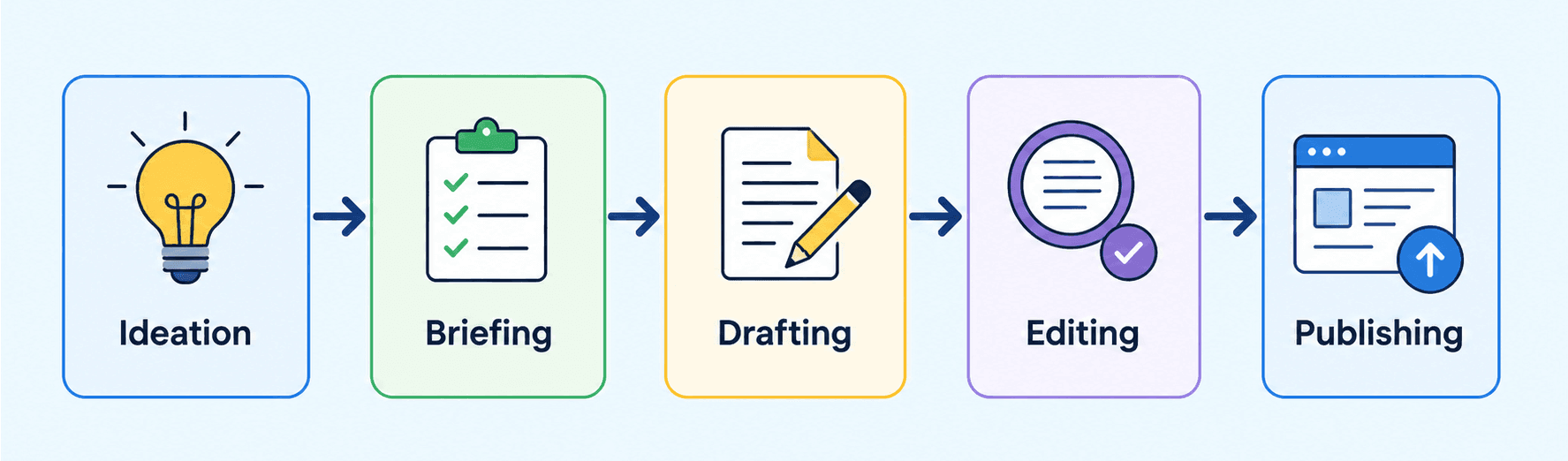
Group your steps into logical stages. Most content workflows fall into five main phases:
- Ideation and keyword research
- Brief creation and assignment
- Drafting and research
- Editing and SEO optimisation
- Formatting, publishing, and promotion
These stages become the main sections of your SOP. Each stage should have a clear starting trigger (what kicks it off) and a clear output (what gets handed to the next stage).
Step 3: Write Each Step at the Right Level of Detail
This is where most SOPs fail. Too vague and people still have to guess. Too detailed and nobody reads it. The right level of detail answers the question: could a competent person follow this without asking me a single question?
For example, compare these two instructions:
- Too vague: “Optimise the post for SEO”
- Too detailed: “Go to Settings, click SEO, scroll to the meta description field, type a 140-150 character description that includes the primary keyword in the first 50 characters…”
- About right: “Complete the Yoast SEO panel: add a focus keyword, write a meta description (140-150 characters) that includes the keyword, and ensure the readability score is green before publishing”
Aim for the middle ground. Assume the reader is competent but unfamiliar with your specific preferences.
Step 4: Choose a Format and Home
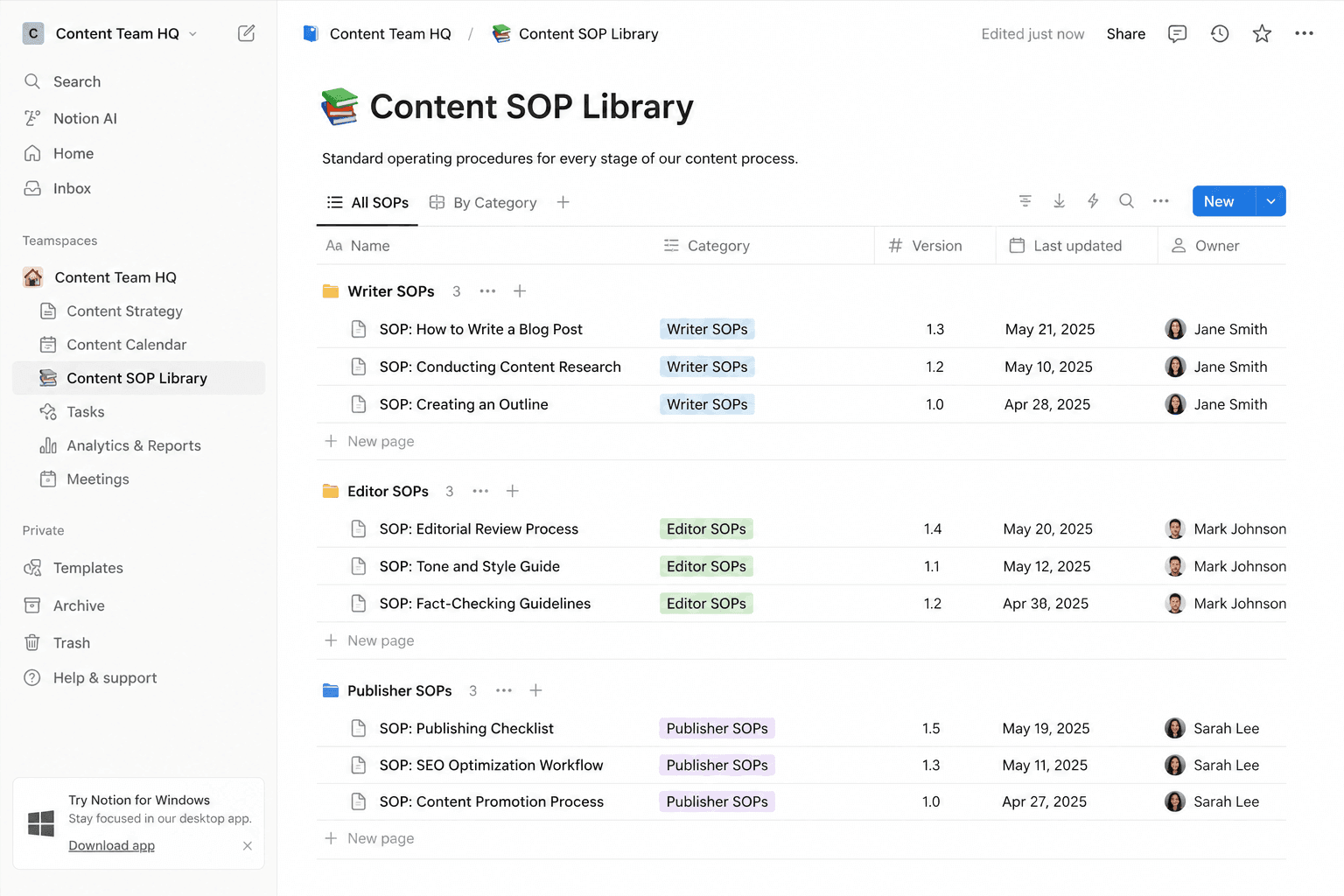
Your SOP needs to live somewhere accessible and easy to update. Common options include Notion, Google Docs, or a dedicated wiki. The best tool is whichever one your team already uses. An SOP nobody can find is not useful.
For each step in your SOP, include the action to be taken, the tool to use, the expected output, and any common mistakes to avoid.
Key Takeaway: Start by documenting what you actually do today, not what you wish you did. Then organise it into stages with clear handoffs between each one.
Role-Based SOP Design for Content Teams
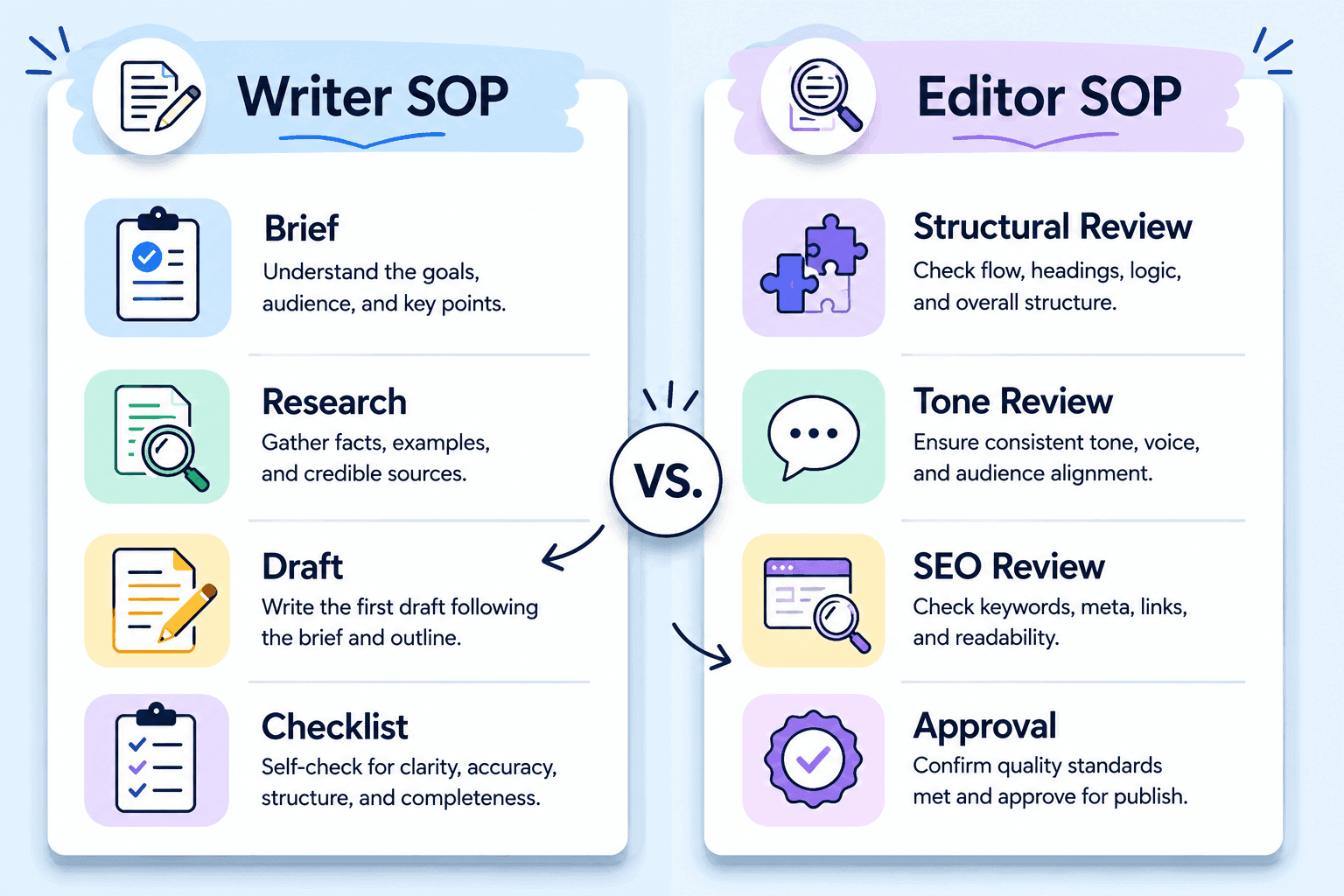
Once your content operation involves more than one person, a single monolithic SOP becomes harder to use. A writer does not need to read the publishing checklist. An editor does not need the brief template instructions. The solution is role-based SOPs: separate documents (or clearly separated sections) tailored to each contributor.
The Four Core Content Roles
| Role | Primary Responsibility | SOP Focus Areas |
| Writer | Produce the first draft | Brief interpretation, research sources, word count, formatting, internal link placement |
| Editor | Improve quality and accuracy | Edit checklist, tone review, fact-checking, SEO review, feedback process |
| Designer | Create visuals | Image specs, naming conventions, alt text, brand colour use, file formats |
| Publisher | Format and go live | CMS checklist, category/tag rules, meta fields, scheduling, post-publish distribution |
In a solo or small operation, one person may cover all four roles. That is fine. The value of thinking in roles is that it helps you isolate which part of the process breaks down when something goes wrong, and it prepares you to hand off tasks one at a time as you grow.
Writing a Writer SOP
A writer SOP should answer: how do I take this brief and produce a draft that meets standards? It should cover the brief format they will receive, the research process (which sources are acceptable, how to fact-check), structural requirements (word count range, heading hierarchy, internal linking rules), formatting conventions, and how to submit the draft.
Include a checklist at the end that the writer self-reviews before submission. This single addition reduces editorial back-and-forth by roughly 40 percent.
Writing an Editor SOP
An editor SOP focuses on what to look for and in what order. A common structure: read the full draft first without editing (to assess overall quality), then edit for structure, then for clarity and tone, then for SEO. Doing it in layers catches different types of problems more reliably than a single pass.
The editor SOP should also define what constitutes a rejection (sent back for major revision) versus what is handled in-line. Clear criteria here prevent friction between writers and editors.
Key Takeaway: Role-based SOPs reduce confusion, make onboarding faster, and allow you to delegate one task at a time without disrupting your whole operation.
Connecting SOPs to Your Broader Content Workflow
An SOP does not exist in isolation. It sits inside a wider content system that includes your editorial calendar, SEO workflow, and distribution pipeline. When these pieces connect properly, your content machine runs on its own momentum.
SOPs and Your Editorial Calendar
Your editorial calendar decides what to publish and when. Your SOP decides how each piece gets produced. The link between them is the trigger point: when a topic appears on the calendar with a publish date, that triggers the brief creation step in your workflow documentation.
Build your deadlines backwards from your publish date. If you publish on Fridays, your SOP might look like this: brief issued Monday, draft due Wednesday noon, edits complete Thursday, published Friday morning. Each deadline becomes part of the SOP for the relevant role.
SOPs and Your SEO Workflow
Content that does not get found is wasted effort. Your SOP should embed SEO tasks into the production process rather than treating them as an afterthought. Keyword research belongs in the brief stage. On-page optimization belongs in the writer or editor SOP. Technical checks (canonical tags, indexing) belong in the publisher SOP.
For teams managing content in WordPress, tracking performance through Google Search Console is a critical post-publish step. Our guide on Google Search Console for WordPress: Setup and Daily Use Guide explains how to integrate this into your weekly workflow.Custom Post Types Explained
If your publishing process involves custom post types or structured content, you will want your publisher SOP to reference the correct setup. Our Custom Post Types Explained: Organize Content Beyond Posts and Pages guide is a useful companion resource.
Your Gutenberg Block Editor Guide: Master WordPress Content Creation is also worth linking inside your publisher SOP if your team uses the block editor for formatting.
SOPs and Your Distribution Pipeline
Most content teams invest heavily in creation and lightly in distribution. Your SOP should include a post-publish checklist that covers sharing to your email list, social channels, and any syndication partners. This turns distribution from a sometimes-happening task into a reliable process.
If you are building your email list as a traffic channel, your SOP can include a step for turning each new post into an email broadcast. See our Email List Building Guide: Grow Your Subscribers from Zero for how to set this up sustainably.
For capturing visitors who arrive from your content but do not convert immediately, your SOP might also trigger exit intent campaigns. Our guide on Exit Intent Strategies: Capture Leaving Visitors Effectively explains how to implement these.
Key Takeaway: SOPs become most powerful when they are connected to your calendar, SEO process, and distribution plan, turning isolated tasks into a joined-up content system.
Writing SOPs That Scale as You Grow
The biggest challenge with content documentation is not writing the first version. It is keeping SOPs useful as your team grows, your tools change, and your strategy evolves. A stale SOP is worse than no SOP, because people follow it and produce the wrong output.
Build in a Review Cycle
Every SOP should have a review date. Quarterly reviews work well for most content teams. During the review, ask: has this step changed? Are there tools in here we no longer use? Is there a step we are doing consistently that is not documented?
Assign one person as the SOP owner. This person is responsible for keeping the document current. In small teams, this is often the editor or content lead.
Use Version Numbers
Label every SOP with a version number and date (for example, v1.2, March 2026). When you update an SOP, increment the version. This way, team members know immediately whether they are working from the current version.
Design for Outsourcing from Day One
If you ever plan to outsource content production (to freelancers, agencies, or offshore teams), your SOP needs to assume zero institutional knowledge. That means including links to examples, screenshots of your CMS, and definitions of any internal terminology.
For an evergreen content strategy that justifies this level of investment, see our guide on Evergreen Content Strategy: Create Posts That Drive Traffic for Years. Building SOPs around evergreen content types gives you the most return on your documentation effort.
Template vs. Reference SOP
As your SOP library grows, distinguish between two types of documents. Template SOPs are used to create new content (a brief template, a content checklist). Reference SOPs explain how to use a tool or follow a process. Keep these separate so writers are not confused about which document to fill in versus which to read.
Key Takeaway: An SOP that is not maintained becomes a liability. Build review cycles, version control, and clear ownership into your system from the start.
A Practical Content SOP Example for Small Teams
To make this concrete, here is a realistic SOP framework for a small content team publishing two to four posts per week. Adapt it to your tools and team size.
Blog Post Production SOP: Overview
| Stage | Owner | Trigger | Output |
| 1. Keyword Brief | Content Lead | Topic on calendar | Completed brief doc |
| 2. First Draft | Writer | Approved brief received | Draft in Google Doc |
| 3. Edit Pass | Editor | Draft marked Ready for Edit | Edited draft with comments |
| 4. Visual Assets | Designer | Draft approved by editor | Images in shared folder |
| 5. Publish | Publisher | All assets ready | Live URL + distribution complete |
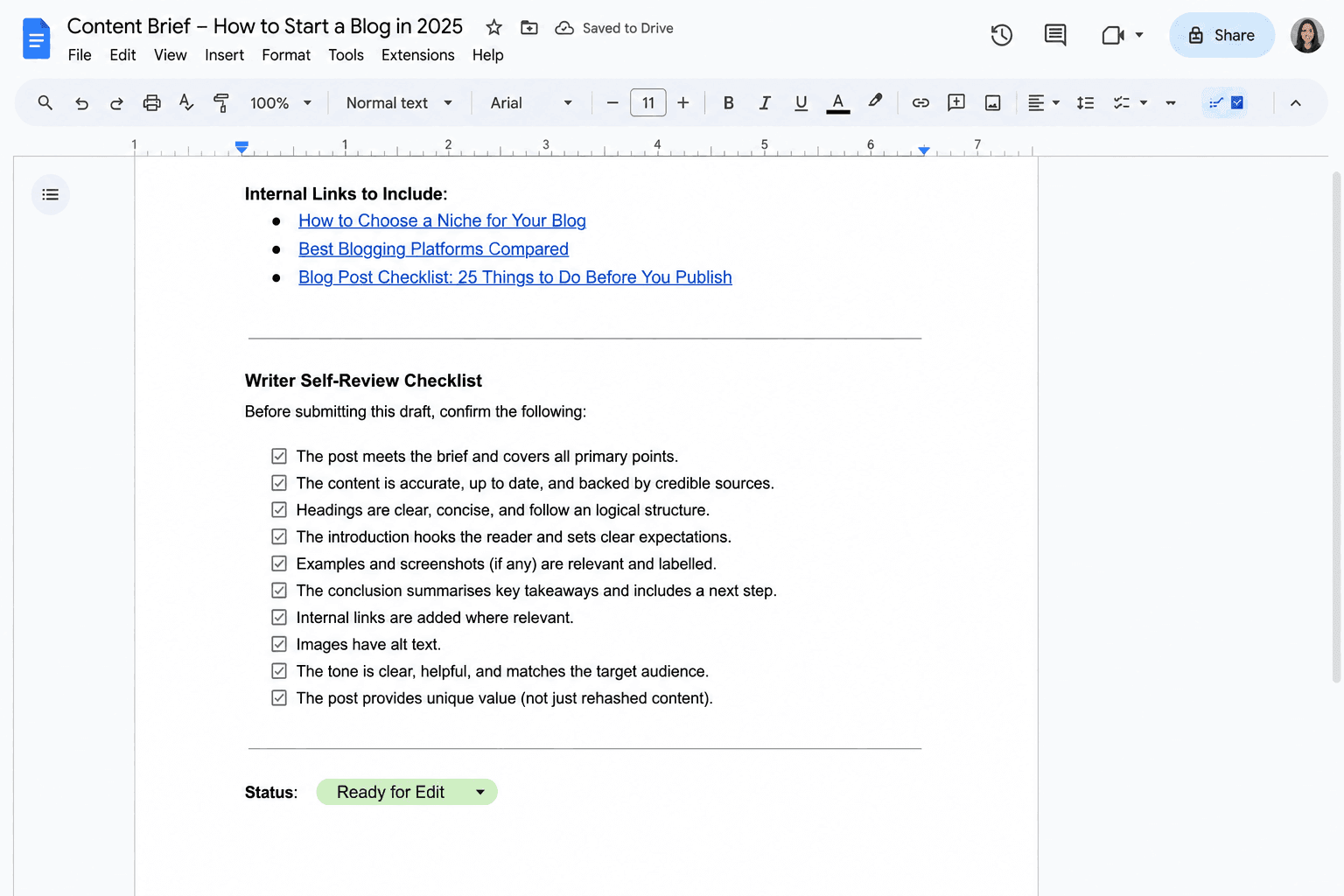
Sample Writer Checklist (End of Draft Stage)
- Word count within 10 percent of target
- Focus keyword used naturally in first 100 words
- At least one H2 contains the focus keyword or a close variation
- All factual claims are linked to credible sources
- At least two relevant internal links included
- All images have descriptive alt text
- Meta description drafted in the document footer
- Draft moved to correct folder and status updated in editorial calendar
This checklist sits at the bottom of the writer SOP. The writer ticks each item before marking the draft ready for editing. Simple. No project management software required.
Key Takeaway: A practical SOP does not need to be long. A one-page stage overview plus a role-specific checklist is enough to produce consistent, high-quality content at scale.
Frequently Asked Questions
What to Do Next
You now have a complete framework for building a content creation SOP that scales. Here are four specific actions to take in the next seven days:
- Audit one recent piece of content. Walk back through every step you took to produce it and write them down. This becomes the raw material for your first SOP draft.
- Create your stage overview. Using the five-stage framework in this guide (Ideation, Brief, Draft, Edit, Publish), map your own workflow to these stages and identify who owns each one.
- Write one role-based checklist. Start with the writer checklist, since that is where most quality issues originate. Use the sample from Section 7 as your starting template.
- Connect your SOP to your calendar. Set a draft deadline and a publish deadline for your next three pieces of content, and assign each stage of your SOP to those dates.
If your content goal is long-term organic traffic, your SOP investment will pay the highest dividends when applied to evergreen content. Read our guide on Evergreen Content Strategy: Create Posts That Drive Traffic for Years to see how to choose the right topics to systematise first.